Hundreds of location pages without risking your main domain
In short
A business with many branches or advisors wants a page for each, so Google and AI assistants find them for questions like "tax advisor in Hamburg". The problem: Google treats hundreds of near-identical template pages that only swap the place name as spam, and that can cost the whole main domain its rankings. The solution: each page carries facts about that branch or person, goes live only when it is complete, and sits in a clear structure on the main domain. scaile plans and builds them as Managed GEO.

Dora is a founding engineer at scaile. She studied computer science, psychology and neuroscience at TUM, which is the perfect fit for GEO: she has a deep understanding of technology and of the human side, and knows how to write and produce content that leads humans to buy and AI to show you in its answers.
Key takeaways
The number of pages is not what hurts a domain. Pages that only swap the city name are, because Google treats them as spam.
Every branch or advisor page needs facts a visitor cannot get anywhere else on your site: address, hours, team, services, specialties.
A page that does not have those facts yet stays out of Google's index until it does.
Keep all pages on your main domain in a clear structure. Separate domains per city are a pattern Google names as spam.
AI assistants can show a branch's rating and opening hours from its Google profile, so the profile and the page must say the same thing.
Can hundreds of location and advisor pages hurt your main domain?
The page count does not hurt your main domain. Pages that look the same and only swap the city or the name do. Sites that break Google’s spam policies may rank lower or not appear in results at all. [1]
Buyers ask it in sales calls like this: “How do we cover several locations or thousands of advisor and branch pages without putting the main domain at risk?” The answer comes down to three rules:
- Own facts: Build each page from the facts of that branch or that advisor, not around a city name.
- Ready before live: Publish only the pages that have enough of those facts. The rest wait.
- One hierarchy: Keep every page on the main domain, in a structure a visitor can browse from the top.
What actually puts the main domain at risk
Four patterns put a domain with many location pages at risk. None of them is about the page count:
Pages that exist only to rank for “[service] in [city]” and send the visitor on to one central page. Google lists “pages targeted at specific regions or cities that funnel users to one page” as doorway abuse. [1]
Many pages generated mainly to rank, with unoriginal text and little value for the visitor. Google calls this scaled content abuse and judges it “no matter how it’s created”, by people, templates or AI. [1]
Text written by independent advisors, freelancers or a white-label service is third-party content in Google’s terms. It is only a problem when it is published mainly to use the host site’s ranking signals. [1]
A Business Profile whose website link sends people to a generic landing page instead of the page for that location. Google asks for a website that represents the individual location. [2]
Advisor pages need visible editorial oversight. Google generally presumes that individual pages, new ones included, match the overall quality of other pages on the domain. [1] In its example of a host where Google is unlikely to act, three things are in place: [1]
- Branding: the site is branded consistently.
- Responsibility: the host states its editorial responsibility.
- Author: the author is named.
For an advisory network, or a software provider hosting pages for the pharmacies it serves, that means one page format, a named author and a central review before anything goes live.
One domain, a clear hierarchy: where the pages should live
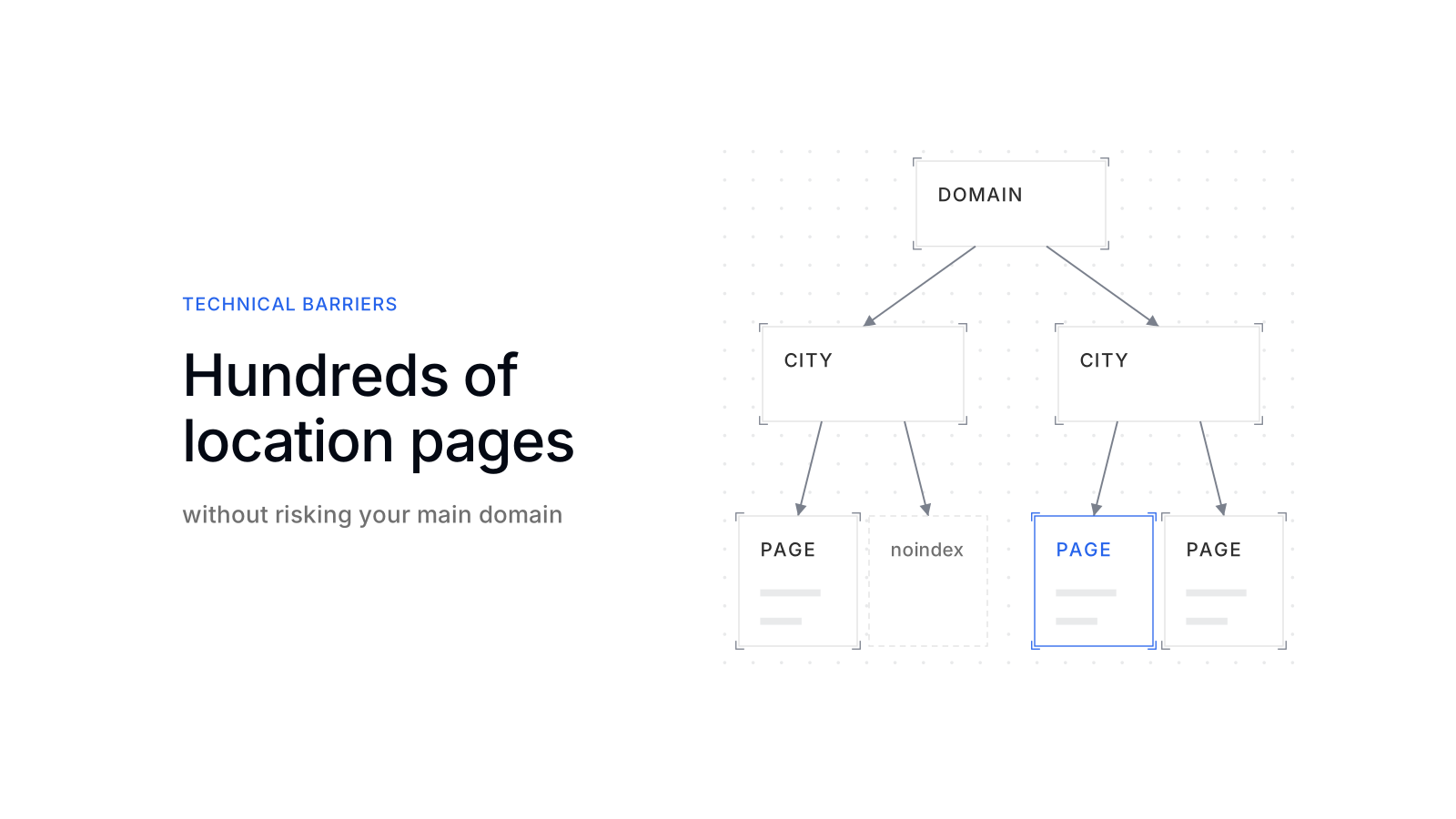
Location and advisor pages belong on your main domain, ordered from the top: brand, region or city, branch, advisor. Separate city domains do not protect the main brand. Google’s doorway examples include “multiple domain names” aimed at regions or cities. [1]
Subfolder or subdomain matters less than the structure. Every page sits in the hierarchy and has its own reason to exist.

Two branches in one city with the same services often end up with the same text. When two pages really cover the same thing, a canonical tag tells Google which one you prefer. Google says this consolidates signals and keeps crawlers from spending time on duplicates. [3]
Crawl capacity is rarely the bottleneck. Google’s crawl budget guide targets sites with over a million pages, or over 10,000 pages that change daily. It also applies when many URLs show as “Discovered - currently not indexed” in Search Console. [4]
What each location or advisor page needs to earn its place
A location or advisor page earns its place when it answers questions that only this branch or this person can answer. The fields differ by page type:
Address, hours and phone of that branch. Services offered there, the team on site, local reviews, and what this branch handles that others do not.
Name, qualifications and licences, specialties, languages and region. How to book, and a short text in the advisor’s own words, reviewed centrally.
A simple test decides whether a page goes live: remove the city name and the advisor’s name. If what is left could stand on any other branch page, the page is not ready.
Next, make the page and the profiles agree:
- Chains: Google Business Profile asks all locations of a chain in one country to use the same name and the category that best represents the business. [2]
- Practitioners: lawyers, doctors or real estate agents may have their own profiles. [2]
- Links: each profile links to the page for that location or person, not to your homepage.
- Markup: Google’s LocalBusiness structured data can describe departments, each with its own opening hours or phone numbers. [5] Mark up only what the page already says.
How AI assistants pick a branch or an advisor
AI assistants pick a branch or an advisor from the pages and profiles their search systems can read. Three sources decide what they see:
- Your pages: Google says there are no additional requirements to appear in AI Overviews or AI Mode, and SEO best practices remain relevant. [6]
- Crawler access: ChatGPT search surfaces websites through OpenAI’s crawler OAI-SearchBot, and sites opted out of it are not shown in ChatGPT search answers. [7] A location page that blocks it is out.
- The business record: in scaile’s look at 50 ChatGPT conversations across 12 industries, every city-specific recommendation prompt produced a map. The pharmacy records matched with Google carried the same rating and review count as on Google (how ChatGPT surfaces local businesses).
So an assistant may take the rating from the profile and the services from the page. If the two disagree, the answer can carry the wrong one.
Advisors are found the same way. A buyer asking for an advisor for business owners in Hamburg needs a page that states the specialty, the client type and the city. A directory of names with a contact form answers none of it.
How to roll out hundreds of pages without risking the domain
Roll out in waves, starting with the branches and advisors that have the most complete data. Widen only when the first wave is indexed and named:
- 1Inventory
List every branch and advisor with the data you hold. The gaps show which pages are not ready.
Your partData from your CRM, HR or branch system - 2Template with minimum fields
Fix the fields a page needs before it can be indexed, and write the text from them.
Your partApprove the template and the minimum fields - 3Publish the first wave
Put the most complete pages live and indexable. Pages below the minimum stay noindex. Google drops a noindex page from its results, but only if robots.txt does not block it, because the crawler has to see the rule. [8]
Your partReview the pages of the first wave - 4Sitemaps per page type
Give branches and advisors their own sitemaps under one sitemap index. One sitemap holds at most 50,000 URLs or 50MB uncompressed. [9]
Your partNone - 5Measure, then widen
Check indexing in Search Console and ask AI assistants your buyers’ city and advisor questions. Then lift noindex page by page and start the next wave.
Your partFill the data gaps

The decision is made per page, never per project. A wave that shows many pages as “Discovered - currently not indexed” is a signal to improve those pages before you add more.
What scaile delivers
scaile runs the SEO and generative engine optimization (GEO) work for a location network as one job: structure, pages, profiles and the measurement in Google and AI answers.
The proof: BILD Reisen built a travel library on its own bookable inventory with scaile. Mentions in AI answers tripled in 11 weeks, and the library drew 45% of the travel section’s Search clicks (case studies).
Tracking only, in scaile’s own platform app.scaile.to, across ChatGPT, Gemini, Perplexity, Claude, Copilot and Google’s AI features.
You getWhich branches and advisors AI answers name, per city, and which pages they citeA strategist and your team share the work, with weekly strategy calls.
You getThe hierarchy, the minimum fields and the wave plan, then pages that go live wave by waveYour teamApproves every page in app.scaile.toscaile takes over completely, including refreshes and monitoring.
You getReports and what scaile plans to do nextYour teamProvides data and approvalsLocation pages are safe on your main domain when each one has its own facts, sits in a clear hierarchy and goes live only when ready. The same qualities make them visible to Google and quotable for AI assistants. To plan the structure and the first wave with a strategist, talk to scaile about Strategy with you.
FAQ
What happens to an advisor’s page when the advisor leaves?
Take the page down and redirect its URL to the branch page or the advisor directory, so links and bookmarks still land somewhere useful. Update or close the advisor’s Business Profile at the same time, so AI answers stop naming them.
Does every advisor need a Google Business Profile?
No. A profile fits advisors who meet clients at a fixed address, because Google expects permanent signage at any address a profile shows. The others need their own page, not their own profile.
Sources
- Spam Policies for Google Web Search | Google Search Central | Documentation | Google for Developers
- Guidelines for representing your business on Google - Google Business Profile Help
- How to Specify a Canonical with rel=“canonical” and Other Methods | Google Search Central | Documentation | Go
- Crawl Budget Management | Google Crawling Infrastructure | Crawling infrastructure | Google for Developers
- Local Business (LocalBusiness) Structured Data | Google Search Central | Documentation | Google for Developers
- AI Features and Your Website | Google Search Central | Documentation | Google for Developers
- Overview of OpenAI Crawlers
- Block Search Indexing with noindex | Google Search Central | Documentation | Google for Developers
- Build and Submit a Sitemap | Google Search Central | Documentation | Google for Developers