How to measure GEO ROI: count the sales AI search brings
In short
Count GEO sales with your own AI channel in GA4, key events with a value, the lead source in your CRM and a "where did you hear about us?" question. scaile sets this up as Managed GEO.

Dora is a founding engineer at scaile. She studied computer science, psychology and neuroscience at TUM, which is the perfect fit for GEO: she has a deep understanding of technology and of the human side, and knows how to write and produce content that leads humans to buy and AI to show you in its answers.
Key takeaways
Google Analytics now has a built-in channel for visits from AI assistants, but it does not catch all of them. Build your own channel that recognises the assistants by their web address.
Mark purchases and form requests as key events with a value, so you see what visits from AI assistants are worth, not only how many there are.
Save where each lead first came from in your CRM, so a deal months later still shows it started with ChatGPT.
Ask every new customer where they first heard of you. It is the only way to count buyers who read an AI answer and never clicked.
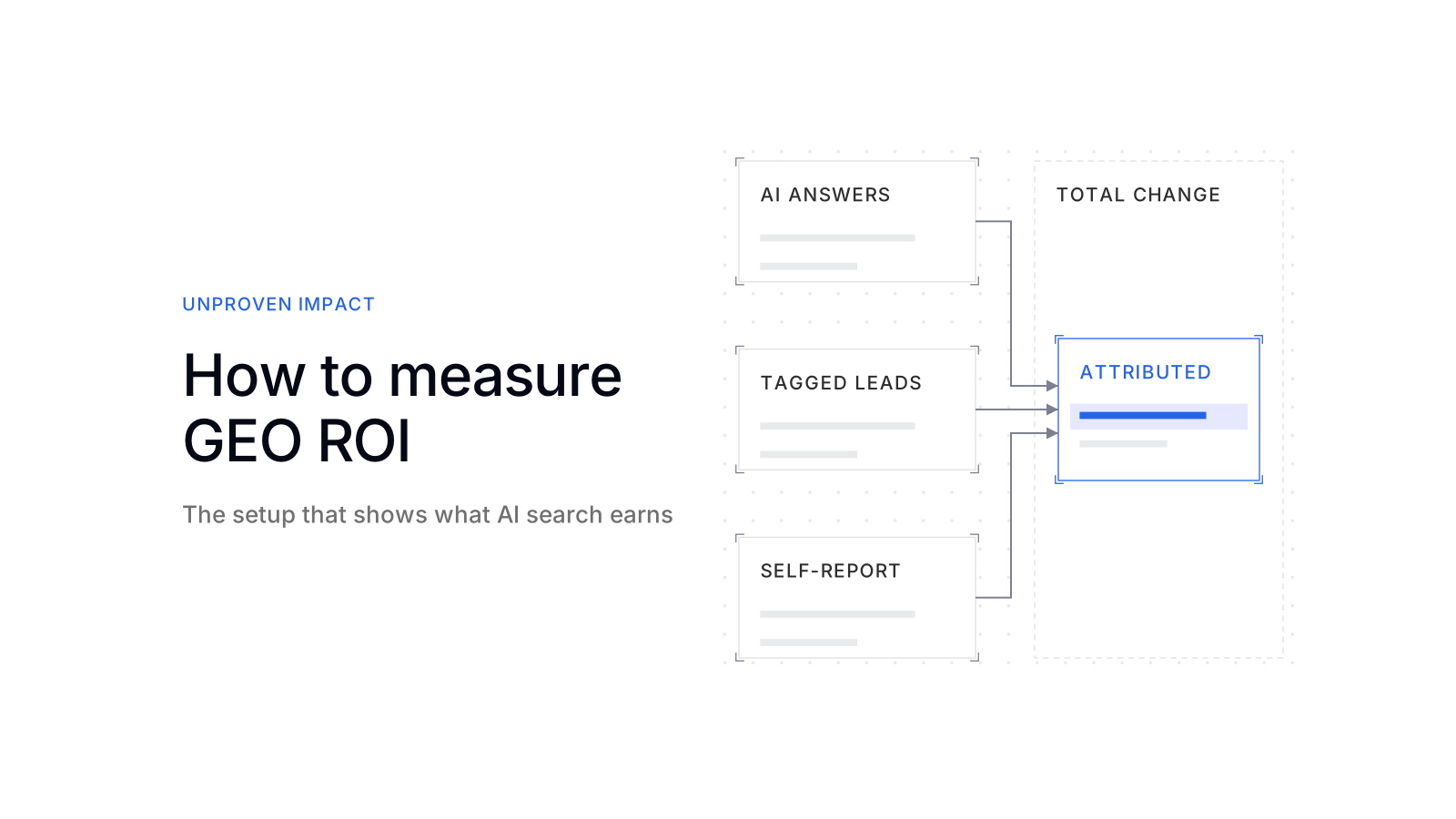
Report two numbers: the sales you can trace to AI search, and the total change in sales since the work started.
How do you see how many sales GEO brings you?
You count the purchases and leads that generative engine optimization (GEO) brings by joining three records and setting what they show against the full cost:
- Clicks: visits from AI assistants in Google Analytics 4 (GA4), with the purchases and form requests they lead to.
- Leads: where each lead came from, kept in your CRM until the deal closes.
- What never clicks: what new customers say when asked where they first heard of you, plus how often AI answers name you when buyers ask about your category.
GA4 alone shows too little. It counts the buyer who clicks a link in an AI answer, not the one who reads the answer and types your name into Google a week later.
The question reaches the board because buyer research has moved. In G2’s 2026 survey, 51% of B2B software buyers start their research with an AI chatbot more often than with Google, up from 29% in 2025. [1] Whether GEO pays off at all is in is generative engine optimization worth it.
What GA4 already counts, and what it misses
GA4 now has an “AI Assistant” channel in its default channel group. A session lands there when its medium is “ai-assistant”, which GA4 sets when the referrer matches Google’s list of AI assistants. [2] ChatGPT also adds utm_source=chatgpt.com to the links in its answers. [3]
That is a start, not a setup. Four kinds of AI traffic still sit outside it:
The channel only covers the referrers Google lists. Any other assistant stays under “Referral”.
A session that matches no channel rule lands in “Unassigned”. [2] The same assistant can then appear in two or three rows.
GA4 describes “Direct” as arriving via a saved link or by entering your URL. [2] A link opened from an app that passes no referrer looks the same.
Clicks from AI Overviews and AI Mode count in Search Console’s Performance report, within the “Web” search type. [4] In GA4 they are organic search.

Attribution adds a second limit. GA4 offers data-driven and last-click attribution; first click, linear, time decay and position-based are no longer available since November 2023. [5] Both remaining models can only weigh visits GA4 recorded, so an answer read without a click gets no credit.
The setup, step by step
Set it up before the first page changes, so you have a baseline to compare against. Six steps cover all three records:
- 1Build your own AI channel by source
In Admin › Channel groups, create a custom channel group with a channel “AI assistants” whose source matches a regex, and place it above “Referral”. [6] Custom channel groups apply to your reports retroactively. [6]
Your partEditor access to GA4 - 2Mark purchases and leads as key events
Use GA4’s recommended events:
purchasefor a completed order,generate_leadfor a form or a request for information. [7] Mark them as key events and send a value with each.Your partYour developer or tag manager sends the events - 3Read sales by AI source
Open Acquisition › Traffic acquisition and switch the channel dimension to your new group. [6] Add landing page as a second dimension to see which pages bring the purchases.
Your partNone - 4Keep the source in your CRM
Store the first source of every lead in a hidden form field, so the CRM record keeps it after the visit and a deal months later still shows it.
Your partAdd the field to forms and CRM - 5Ask where they heard of you
Add “Where did you first hear about us?” to forms and the first sales call, with “ChatGPT or another AI assistant” as its own answer.
Your partAsk and log the answer - 6Tie content to conversions
Search Console’s generative AI report shows how often each URL appeared in Google’s AI features, as impressions only. [8] Read what buyers want on the pages with the most impressions, then set those pages against the purchases from step 3.
Your partSearch Console access and, where possible, CRM data
Google’s own example regex for the channel starts with ^.*ai|, which matches any source containing “ai”, such as a mail client. [6] A narrower version for step 1:
.*(chatgpt|openai|perplexity|gemini|copilot|claude|deepseek|grok).*Check it against your own Source report once a quarter, because new assistants appear and addresses change.
What clicks never show
The fifth step is the only one that counts the buyer who read an answer and never clicked. Everything GA4 records starts with a click; a buyer who remembers your name from ChatGPT and searches for it later arrives as branded search or direct traffic.
Four more sources narrow the gap:
-
CDN logs: your CDN’s logs show whether AI crawlers already fetch your pages. OpenAI, for example, runs OAI-SearchBot for search and GPTBot, whose content can be used to train its foundation models. [9] A page no AI crawler fetches cannot be cited.
-
Fixed buyer questions: ask AI assistants the questions buyers ask right before they choose, many times each, see which prompts to track. Asked 100 times, ChatGPT or Google’s AI had less than a 1 in 100 chance of giving the same brand list twice. [10]
-
Bing AI Performance: Bing Webmaster Tools shows how often your content is cited in generative answers, which URLs and how that changes over time. [11] It counts citations, not sales.
-
Branded search: a rise in searches for your brand name in Search Console, while you work on AI answers, points to buyers who heard of you there.
How to read and report the numbers
Look for the same movement in every record; one rising alone proves little. When AI answers name you more often, AI-channel purchases rise and more customers say “ChatGPT”, the case is strong.

When the records do not move together, the pattern shows where to look:
The questions may sit too early in the buying process. Check for questions asked right before a purchase.
The effect runs through people who come back later. The traced number is too low here.
These visitors may have found you anyway. Check whether they buy.
Check the work first: are the changed pages live, crawlable and cited? When each record starts to move is in how long GEO takes.
Then report two numbers, never one:
Purchases and deals with a recorded AI touch: the AI channel, the CRM source or the customer’s own answer. You can defend it line by line, and it misses every buyer who left no record.
The change in sales since the work started, against the period before. It includes buyers who read an answer and came back later, and everything else that changed.
Set both against the full cost: fees, tools and your team’s hours for reviews and approvals, see GEO cost. Agree on this with finance before the work starts, so the quarterly meeting is about the result, not the method. A visibility score alone is not a return, see what a good AI visibility score is.
What scaile delivers
scaile runs SEO and GEO as one job and finds your buyer questions with you from data, so the report follows the questions buyers ask before they buy. For BILD Reisen, mentions in AI answers to travel booking questions tripled inside one stable prompt panel (BILD Reisen case study).
Tracking only, no strategy or content, in app.scaile.to across ChatGPT, Gemini, Perplexity, Claude, Copilot and Google’s AI features.
You getYour share of answers, the sources cited and a stable baselineA strategist builds the plan from your AI visibility, search and analytics data, and scaile executes it (for content teams).
You getOne weekly report with AI visibility, Search Console, GA4 and revenueYour teamReviews and approves every stepscaile takes over GEO completely: strategy, website changes, content, publishing, refreshes and monitoring (for teams without one).
You getReports, the measurement setup and the next stepsYour teamProvides expertise and approvalsCounting the sales GEO brings takes an AI channel built by source, key events with a value, the lead source in your CRM and one question to every new customer. Report traced sales and the total change apart, and the gap stops being an argument. To set this up for your site, talk to scaile about Strategy with you.
FAQ
Can you measure GEO ROI without a CRM?
Partly. You can read AI-assistant visits and purchases in GA4, but without a lead record you cannot tie a deal closed later to its first source. A spreadsheet of leads with source and the customer’s own answer is the minimum.
Does the ROI count SEO gains too?
The total change in sales does, because it includes every channel. In GA4, the AI channel sits apart from organic search, so you can report the two side by side.
Sources
- In the Answer Economy, Don’t Win the Click — Win the Answer
- Default channel group - Analytics Help
- help.openai.com
- AI Features and Your Website | Google Search Central | Documentation | Google for Developers
- Get started with attribution - Analytics Help
- Custom channel groups - Analytics Help
- GA4 Recommended events - Analytics Help
- Introducing Search Generative AI performance reports in Search Console | Google Search Central Blog | Google f
- Overview of OpenAI Crawlers
- NEW Research: AIs are highly inconsistent when recommending brands or products; marketers should take care whe
- Introducing AI Performance in Bing Webmaster Tools Public Preview |…