AI visibility for agencies: track and manage your clients
In short
With scaile, every client of your agency gets its own workspace: tracked prompts, Search Console, GA4 and AI data in one place, and articles that close its gaps, delivered under your name.

Dora is a founding engineer at scaile. She studied computer science, psychology and neuroscience at TUM, which is the perfect fit for GEO: she has a deep understanding of technology and of the human side, and knows how to write and produce content that leads humans to buy and AI to show you in its answers.
Key takeaways
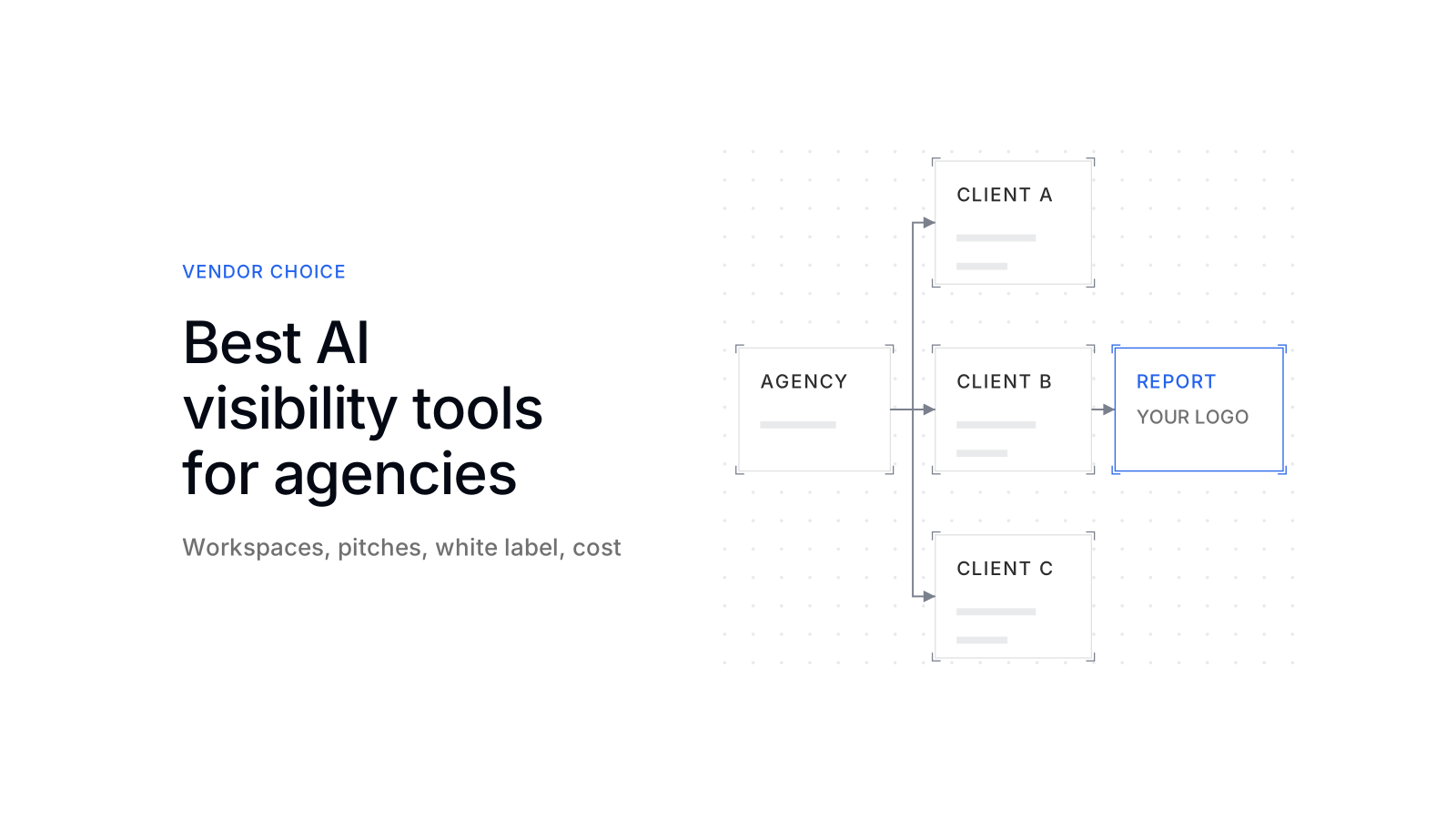
Every client gets its own workspace in scaile, with its own prompts, competitors, users and data. Nothing mixes, and you switch between clients in one click.
Search Console, GA4 or Rybbit and AI visibility sit on one page per client. The AI briefing says which sources matter most for that client.
Prompts are sorted by clusters and tags. New prompts are marked in the trend, so a jump in the numbers is not misread.
Test workspaces and Pitch Reports show a prospect their own gap before they sign. Reports go out as PDFs under your agency's name.
What scaile does especially well: it does not only show the gap, it closes it. Content clusters and articles for every client are planned, written and published in the same workspace.
What does an agency need from an AI visibility tool?
An agency needs a tool that keeps many clients apart, wins new ones, reports to each under the agency’s own name and turns the data into work. scaile is built for that:
- One workspace per client: its own knowledge, prompts, competitors, users and permissions. You invite clients if you want, or scaile stays fully in the background.
- All data in one place: Search Console, GA4 or Rybbit and AI visibility in one overview, instead of three tools and a spreadsheet.
- Pitch and report under your name: test workspaces and Pitch Reports for prospects, client-ready PDF reports for existing clients.
- Content that closes the gaps: research, content clusters and articles per client, grounded in the client’s Brand Kit and knowledge base.
How to manage your clients in scaile
In scaile, every client has its own workspace. There you see how AI assistants talk about the client, which sources they use for it, how competitors perform and which articles are in progress. The screenshots show the workspace of a test company.
All of a client’s data on one page
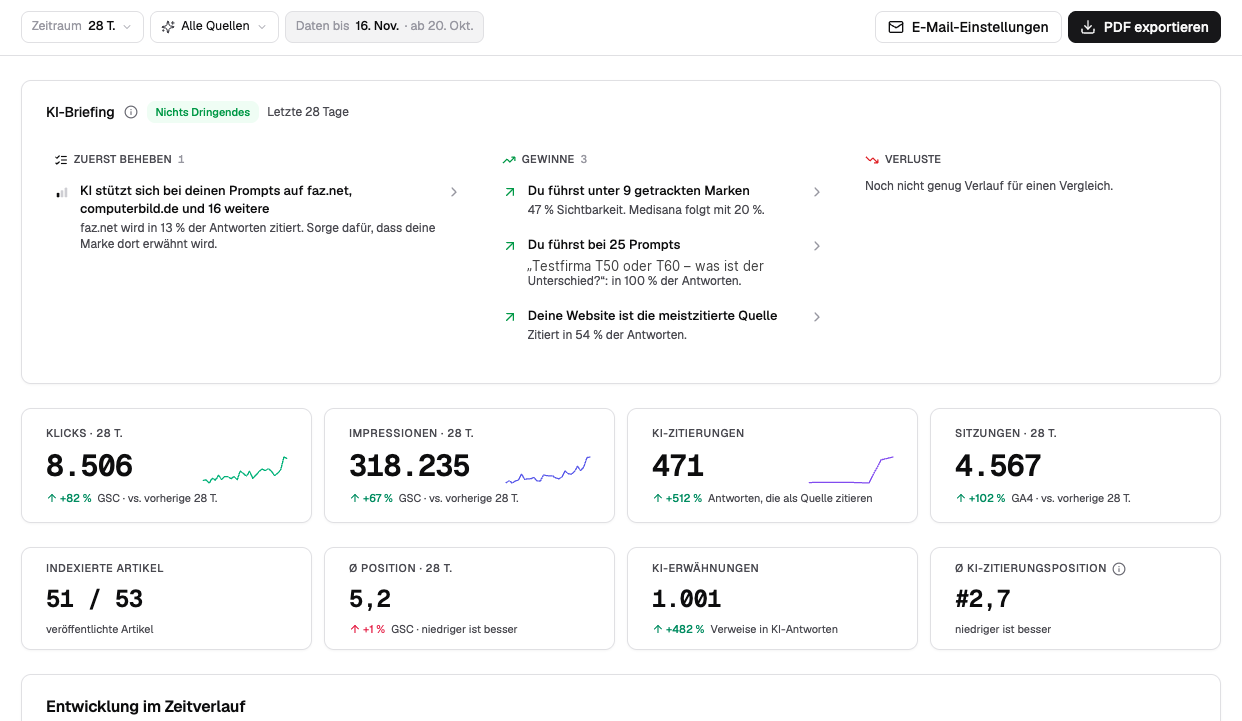
The overview brings together data from Google Search Console, from GA4 or Rybbit and from AI tracking. The AI briefing above it says what to do first:
01 Find the key sourcesUnder "fix first" are the pages AI answers to your client's prompts rely on, here faz.net and computerbild.de. A mention there pays directly into visibility.
02 SEO and AI side by sideClicks, impressions and position from Search Console, sessions from GA4 and AI citations sit in one row, each compared with the previous period.
Prompts, competitors and sources
In prompt tracking you see which prompts run for the client, how it performs against its competitors and which domains the AI systems cite:
01 Filter by cluster and tagsEvery prompt belongs to a cluster and carries tags. That way you read the numbers for one topic, one product or one stage of the customer journey on their own.
02 Manage promptsYou add new prompts yourself or take them from the suggestions. Next to them you see how much of your quota is in use.
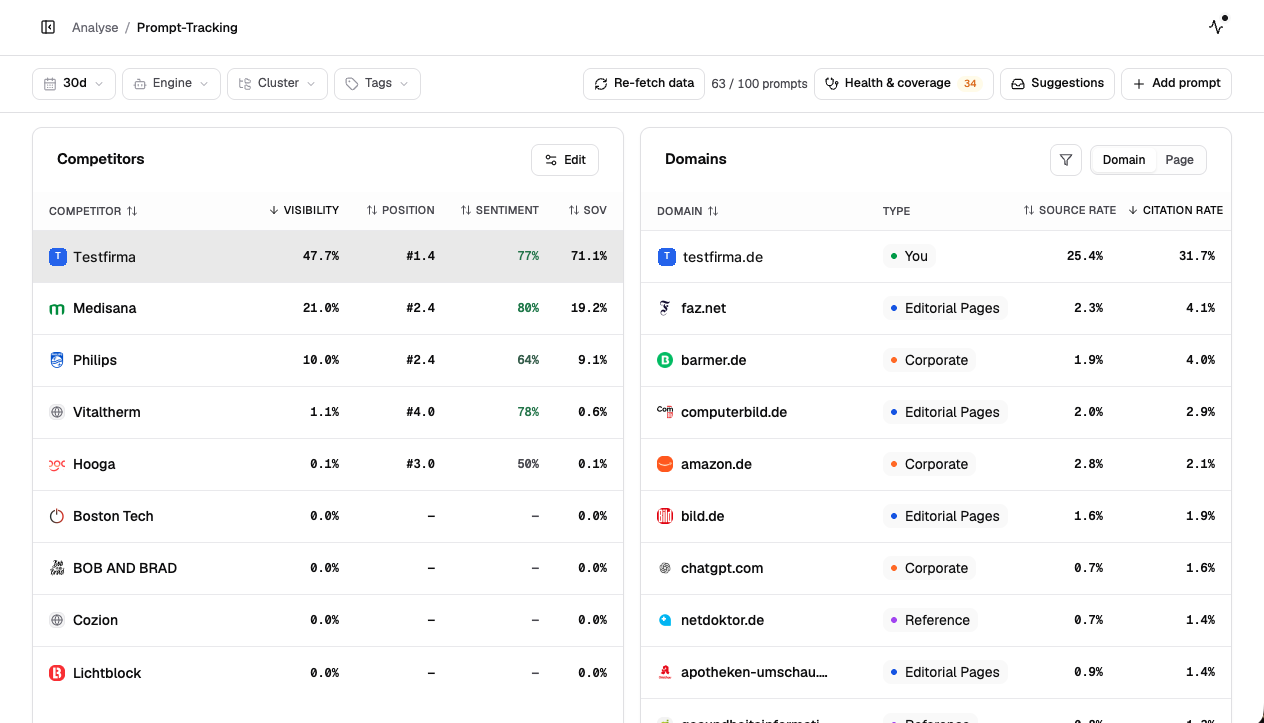
03 Compare competitorsVisibility, position, sentiment and share of voice for the client and every competitor in one table.
04 Sources by weightThe domains AI answers use, sorted by citation rate. The client's own website is marked "You"; the media and portals next to it show where work pays off.
Trend and new prompts over time
The trend shows how the numbers of the client and its competitors change, and marks when new prompts were added:
01 Pick a metricVisibility, source rate, average position, share of voice or sentiment, as a daily, weekly or monthly view.
02 Break it down by AI systemGoogle AI Mode, ChatGPT, Perplexity and Gemini, each with its own visibility, source rate and sentiment.
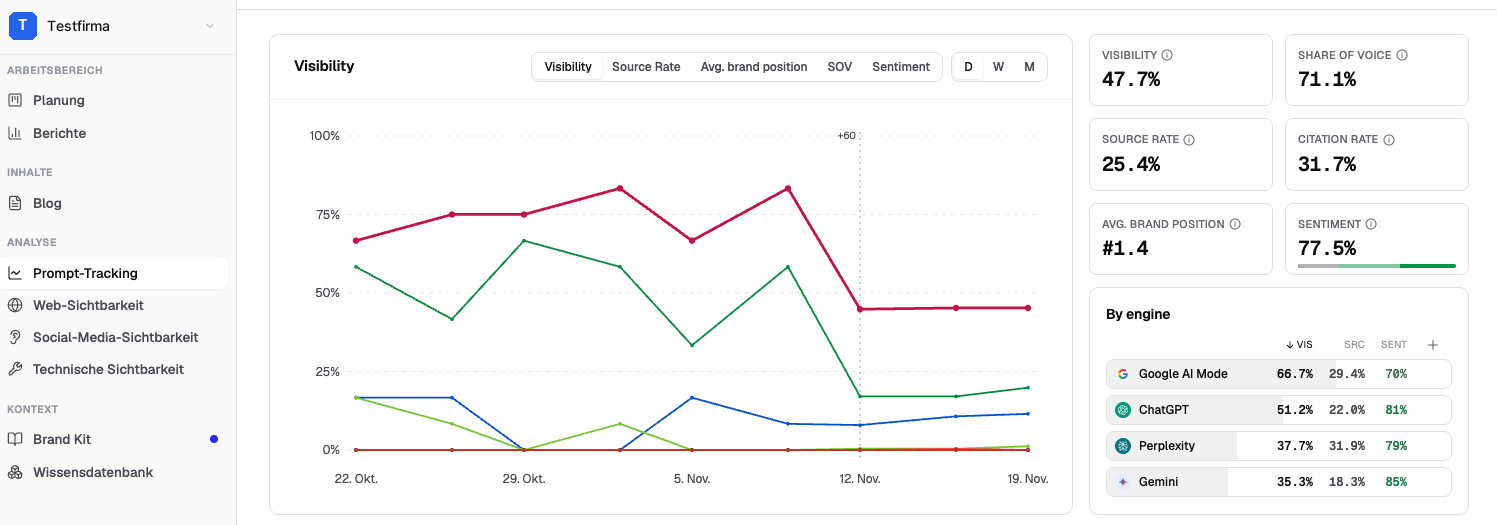
03 Spot new promptsA marker in the chart shows the day new prompts were added. That way you do not mistake a jump caused by more prompts for a real change in visibility.
Plan, write and publish articles
The gaps in tracking become articles. In planning you see which article comes out when and what status it is in:
01 One article per cardEach card shows the title, cluster and subcluster, and the status. That way you see which of the client's topics are already covered.
02 Follow the statusEvery article moves from Planned through Draft and Reviewed to Published.
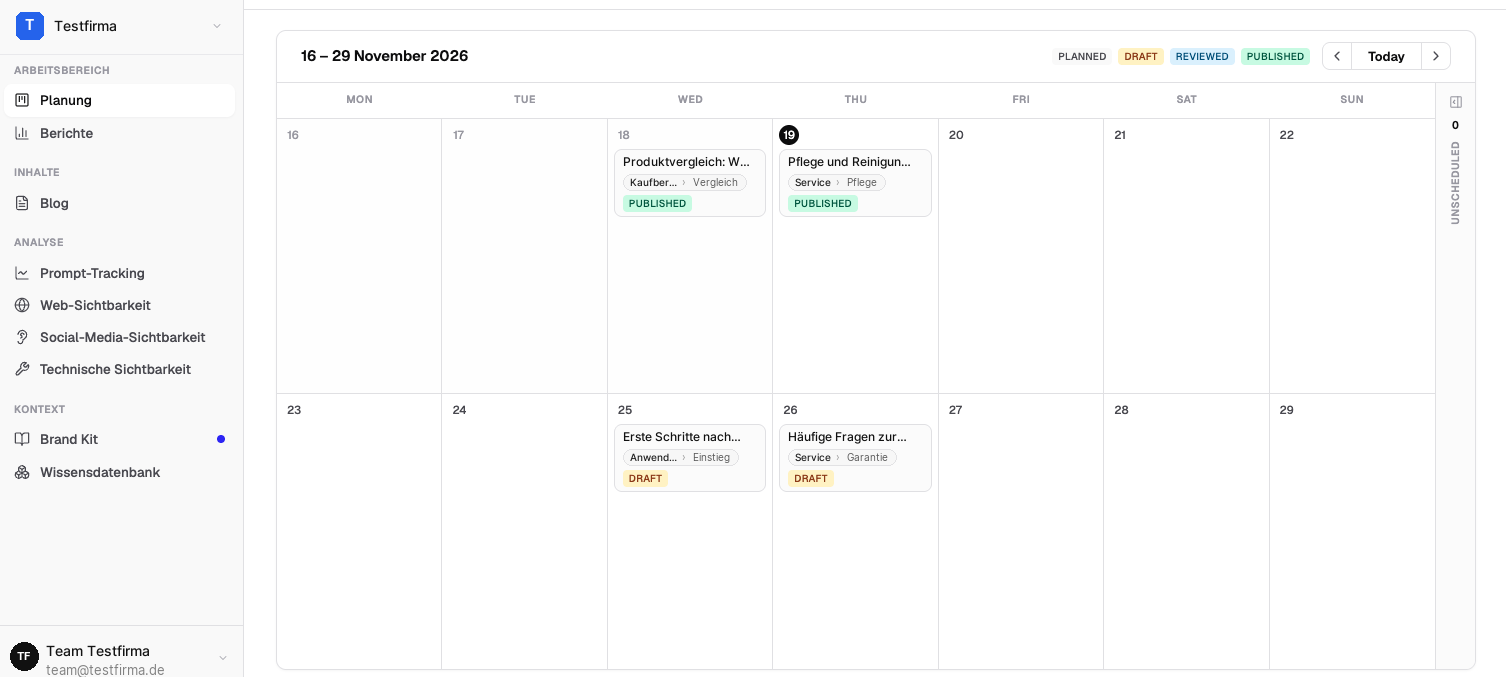
03 Write and publishUnder Blog you write, edit and publish the articles. Under Reports you then see how each article performs in Google Search and in AI answers.
Pitch: show the prospect their own gap
With scaile you set up a test workspace for a prospect before they sign. You bring a Pitch Report to the first meeting with the prospect’s own AI answers instead of a generic slide: for which questions they are named, where a competitor appears instead and which sources the AI systems use for it.
In the pitch, track the prospect’s buying questions, not their brand name. A prompt with the brand name usually returns the brand. The gap a prospect pays to close lies in the questions buyers ask before they know the brand. After signing, you keep working with the same prompts.
Reports under your agency’s name
In scaile you choose the data a client should see and export it as a client-ready PDF report under your name. scaile can stay fully in the background, and your existing service model does not change.
Visibility, share of voice, competitors, key sources and how the articles develop in Google Search, as a PDF for the monthly meeting.
If a client wants to look for themselves, you invite them to their workspace with their own permissions. They then usually see app.scaile.to.
For larger partnerships, scaile runs on your agency’s own domain.
Which metric belongs in the report is explained in share of voice in AI search.
From gap to published article
A report alone changes no AI answer. scaile turns a client’s gaps into articles, in the same workspace where tracking happens:
- Plan: The prompts the client loses become content clusters and a dated plan.
- Write: Every article draws on the client’s Brand Kit, knowledge base and evidence, so no generic AI text comes out.
- Review: Your team keeps review and approval. Every article moves from Draft through Reviewed to Published.
- Publish: scaile publishes directly to the client’s common CMS platforms.
- Measure: Under Reports you see how each article performs in Google Search and in AI answers.
Your team can keep its writers and strategists. scaile takes on as much of it as you want to hand over.
Which model fits your agency
scaile works behind your agency. You decide how the service is packaged, priced and delivered; scaile contacts your clients only if you ask it to. According to the agency page, every client comes with tracked prompts, research, content clusters and articles, plus monitoring and reporting.
Tracking only: each client’s prompts across the AI assistants, in its own workspace in app.scaile.to.
You getClient reporting, without building a content serviceA scaile strategist builds each client’s plan from its data; your writers and strategists keep working in their own process.
You getMore clients with the same teamscaile researches, writes, publishes and updates the content, with weekly strategy calls.
You getA full GEO service under your name, without new hiresYou can also mix the models: Track for clients with their own content team, We run it for clients who buy the full service. Billing is per active client per month, with volume pricing as your portfolio grows. No tool and no partner can guarantee rankings, citations or revenue.
If your agency wants to give every client tracking, reports and articles from one system, talk to scaile about the Agency Partner Program.
Frequently Asked Questions
Can my clients log in to their own workspace?
Yes, but it is optional: you can invite a client to their own workspace with its own team, permissions and data, or keep scaile fully in the background.
Does scaile contact my clients directly?
Only if you ask it to. Your account manager at scaile supports your agency team, not your clients.
Can we use our own writers and strategists?
Yes. Your team uses scaile for research, strategy, creation and reporting and keeps its existing processes.
How is scaile’s agency pricing structured?
Per active client per month, with volume pricing as your portfolio grows, and monthly cancellation. We go through the numbers on a call.